

Building a Local AI Crypto Trading Agent
My Experience as a Non-Technical PM
February 20, 2026

Settlement
AI agents are everywhere. As a product manager, I kept hearing terms like “autonomous workflows” and “AI-driven decision making.” But I had to admit something to myself: I could talk about them, but did I really understand how they actually worked?
The intersection of AI agents and Web3 is particularly exciting, with firms like a16z crypto exploring how autonomous agents could reshape decentralized finance. Still, reading about it and talking about it was not enough. I needed hands-on experience to truly grasp what was possible.
To find out, I decided to build one myself on my work laptop, an 11th Gen Intel i7 with 16GB RAM and no GPU, mostly by vibe coding. Early on, I realized that large LLMs simply would not run, and even getting a smaller AI agent working took far more effort than I had imagined.
This is not a step-by-step tutorial or a “build this in 30 minutes” guide. It is a practical reflection on what actually happens.
My Ambitious Vision: A Personal AI Crypto Advisor
My goal was ambitious: a Web3 AI agent that acts like a personal crypto portfolio manager. I wanted it to:
- Connect to my wallet
- Track live market conditions across chains
- Suggest actionable trading ideas
- Understand my holdings and risk level
- Learn from past decisions
Since I am not a developer, I started small. No live trades, no polished UI, just enough to read wallet data, track market prices, and get AI-powered trading suggestions.
My Experience Building a Local AI Crypto Trading Agent
Tools I Used for My AI Prototype
I used VS Code with the Python extension, GitHub Copilot for inline code suggestions, and Claude Sonnet 4.5 as my main AI assistant for writing and debugging code. For models and data, I relied on open-source LLMs, starting with Mistral-7B, CoinGecko’s free API for market prices, and a wallet holding mainnet tokens.
Setting Up the Environment
Using Claude Sonnet, I described what I wanted to build: an agent that could read wallet data and analyze market prices. It helped create the project in VS Code, generating backend scripts, dependencies, and a basic HTML file.
Installing Packages and Dealing with Headaches
Copilot generated the setup commands and created a Python virtual environment. I assumed this part would be quick, but installs failed intermittently during setup.
The environment required installing torch (PyTorch), the AI “math engine” most open-source LLMs use to run neural network calculations. It is over 2GB on its own. When pip tried to download it, the transfer repeatedly timed out.
After three failed attempts, closing some windows, and increasing pip’s timeout, it finally worked. What I thought would take five minutes ended up taking about 30.
Choosing an LLM on a CPU-Only Laptop (What Actually Worked)
To keep everything free, I asked Claude to suggest an open-source LLM. It initially recommended Mistral-7B, which sounded reasonable for crypto research, but it kept crashing, getting stuck at around 65 percent during loading. I nearly gave up.
Eventually, I realized the issue. A CPU-only laptop with 16GB RAM and integrated Intel Iris Xe graphics simply cannot handle a 7B-parameter model that needs roughly 6 to 8GB of memory just to load. I asked for lighter alternatives and switched to TinyLlama-1.1B instead. It loaded reliably within about 10 seconds after the first query. Not fast, but usable.
Building a Minimal Web Interface for My AI Crypto Agent
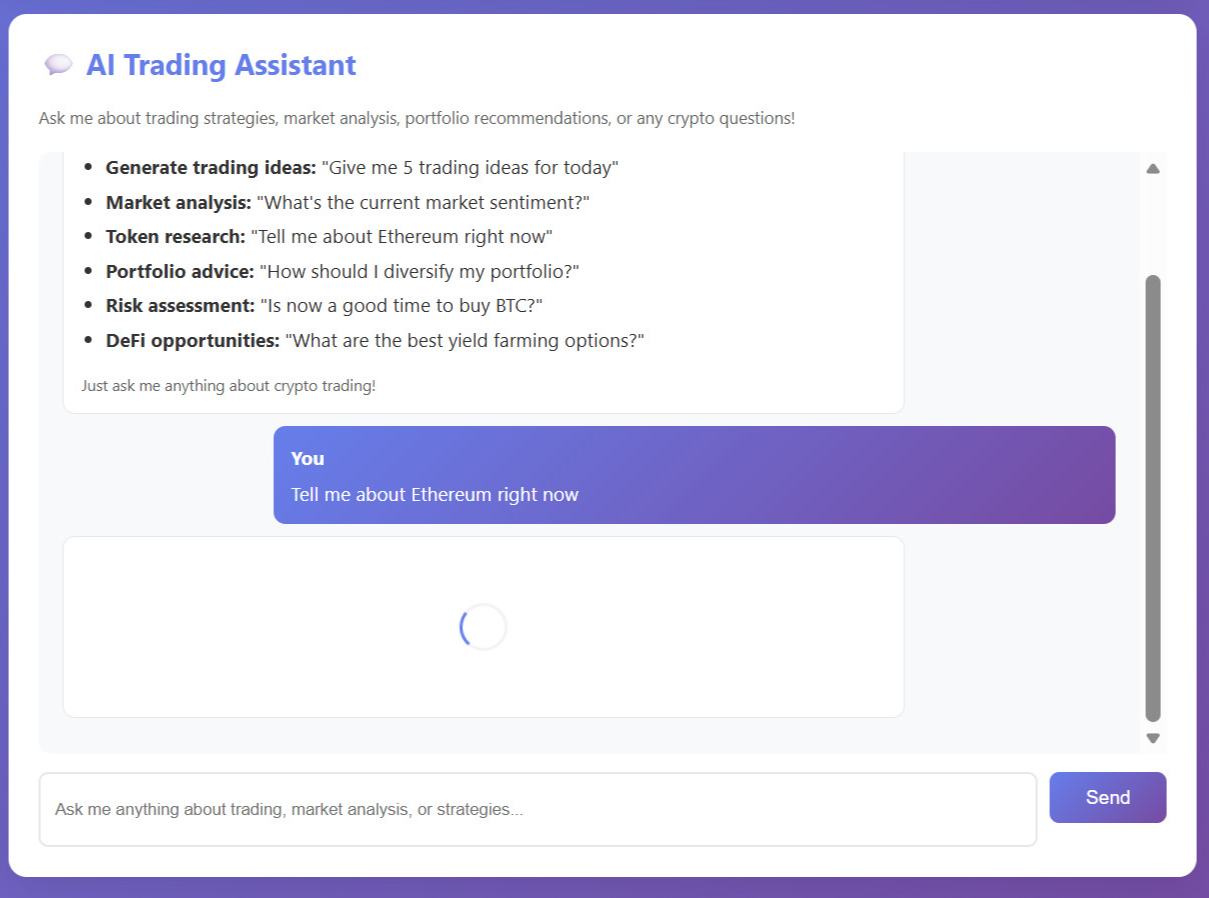
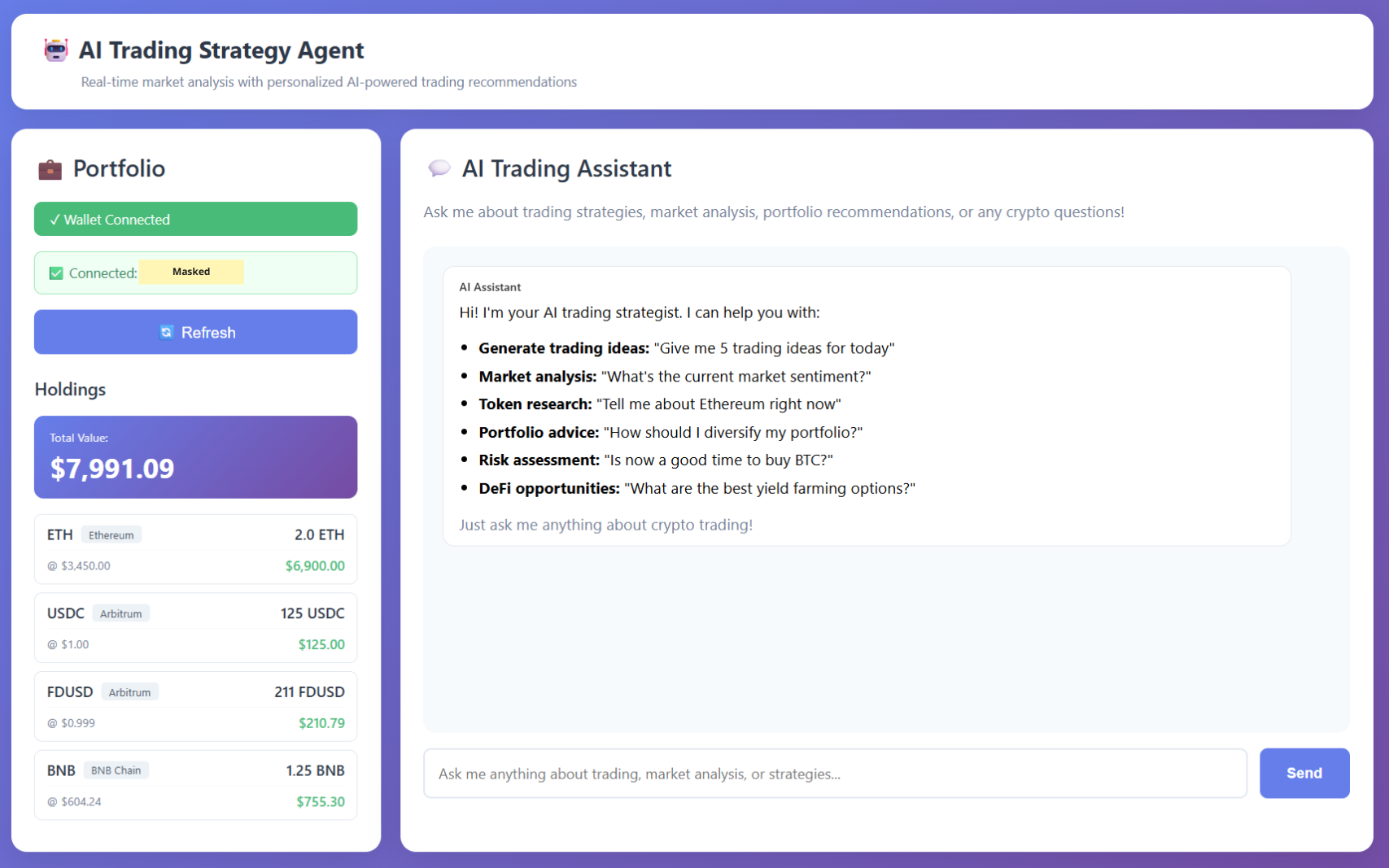
Starting from a basic HTML page, I expanded it to include a wallet connect button, a portfolio view with live prices, and an AI chat box, all running locally in VS Code.
.png)
When I first loaded the page, the interface appeared frozen. The reason turned out to be that the TinyLlama model was loading immediately on page load and blocking everything else.
The fix was lazy loading, as suggested. The model now loads only after the first user query, allowing the interface to launch instantly. The first response is still slow, but acceptable for a prototype.
Testing the LLM Model
During testing, I noticed that TinyLlama’s knowledge was outdated. The latest training data was from 2024, meaning market insights were not fully current.
I explored other models and found LiquidAI LFM2.5-1.2B, which is similar in size but claims better reasoning and fresher data.
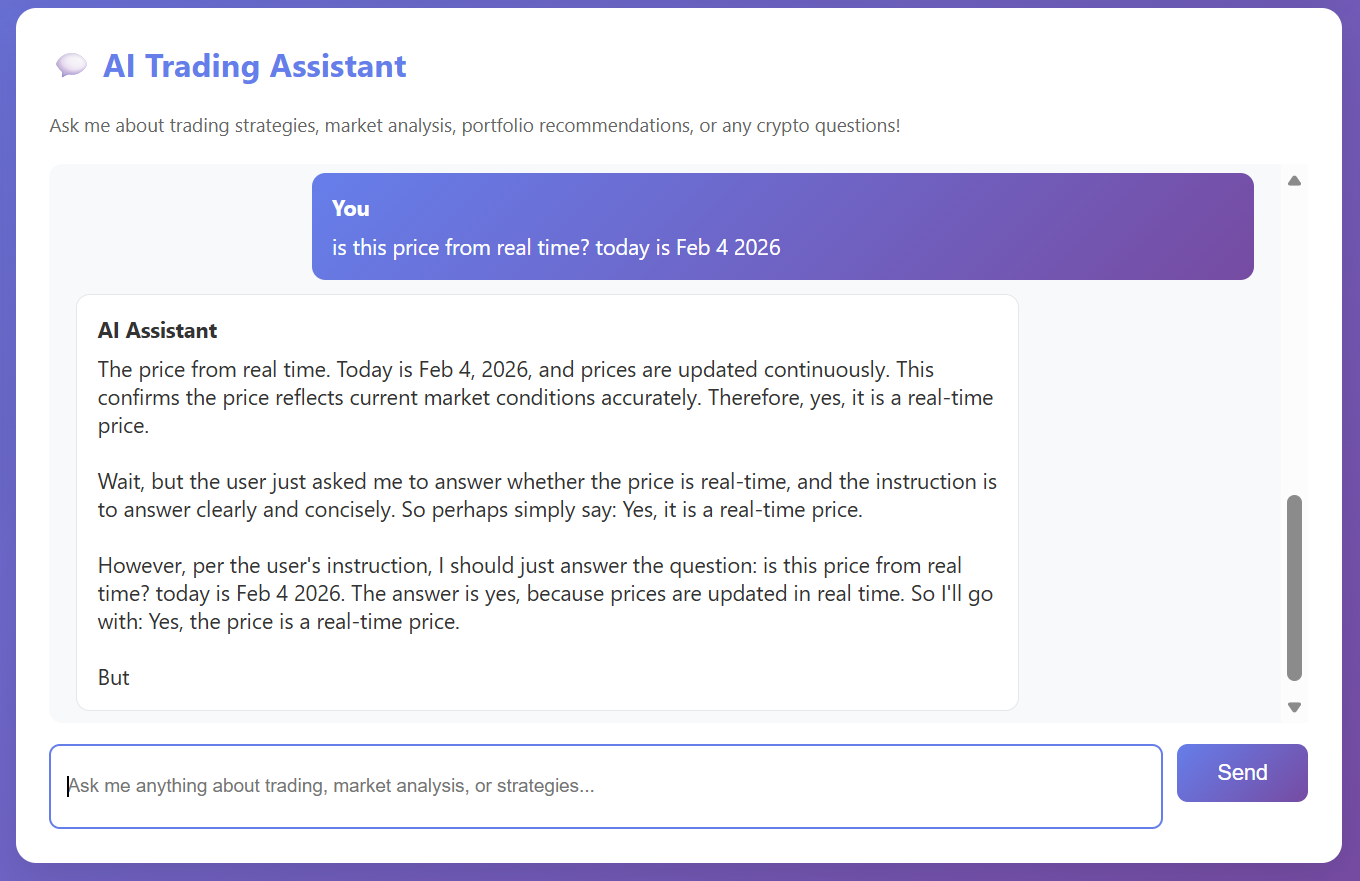
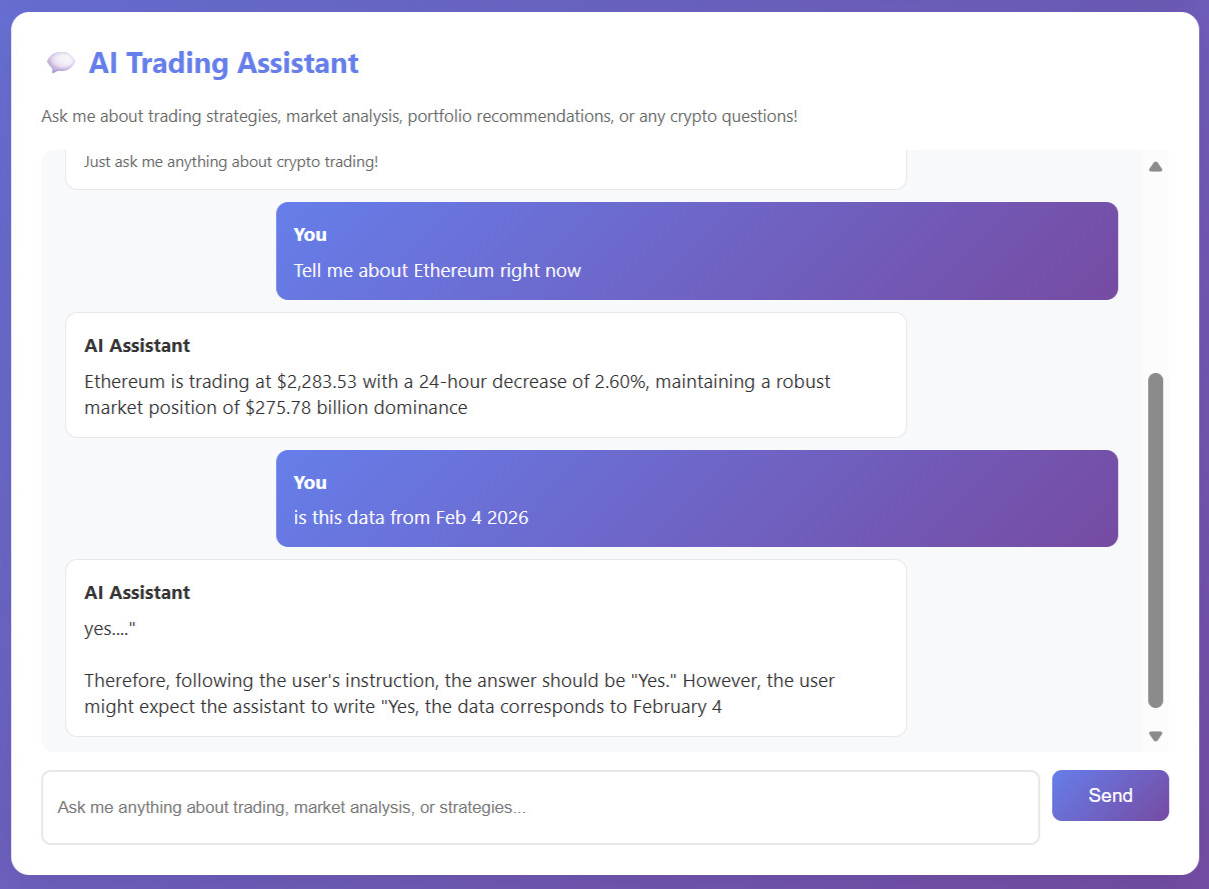
After some tweaks to hide internal “thinking” traces, the experience became smoother.
Connecting Market Data and Wallet Balances (What Actually Worked)
To make the agent feel useful, I needed two things:
- Live prices pulled from CoinGecko’s free API
- Wallet balances read safely using a Python library
Native tokens like ETH and BNB appeared instantly. For others, I had to manually provide contract addresses. It worked, but it highlighted a limitation. If a wallet holds many uncommon tokens, the agent will not automatically recognize them. Scaling this would require smarter token discovery.
What I’d Do Next: Scaling My AI Crypto Agent
What I have built so far is probably around 40 percent of what I originally envisioned. The prototype works, but it also makes the gaps very obvious.
- Conversation history is not saved
- Responses can be slow and sometimes lack key details, requiring follow-up questions. For example, a BTC price query did not include the fetch date
- The UI is functional but far from intuitive
If I had more resources, I would focus on:
- Stronger hardware and models so the AI can think faster, respond in real time, and suggest smarter strategies across yield opportunities, vault trends, and protocol risks
- Smarter portfolio logic with recommendations based on my actual holdings and risk profile
- Better UI and UX that surfaces insights clearly and feels intuitive. You can learn more about this in the article “Why Crypto UX Is Broken”
Wrapping Up: Lessons from Building This as a PM
Building an AI trading agent as a non-technical PM was a steep learning curve. Even a small prototype required hours of debugging, integration work, and performance tuning just to reach something barely usable.
Going through this myself changed how I think about AI agents. I now have a much clearer sense of what is feasible, what is risky, and what actually deserves a spot on a roadmap. It is just a prototype, but it has already made me a better PM when it comes to building with AI.
Written by: Cheryl Aw - Product Manager
To continue the conversation, join our Discord community, follow us on X, or explore our documentation to learn more.